

A New Era of Coding Begins
Imagine opening your laptop to write code, and before you even finish a line, the computer understands what you want and completes it for you. Sounds exciting, right? Today, developers no longer work alone because AI sits beside them as a coding partner.
If you are new to AI in application development, you will love this journey. Let’s start with the most popular AI tool that has changed how millions of developers work: GitHub Copilot.
What is GitHub Copilot?
Have you ever wished that writing code could feel smoother and quicker?
GitHub Copilot makes that possible. It is an AI pair programmer that helps developers write code faster and with fewer mistakes. Copilot works inside code editors like Visual Studio Code and suggests code as you type, just like a smart assistant who knows what you want next.
How Does GitHub Copilot Work?
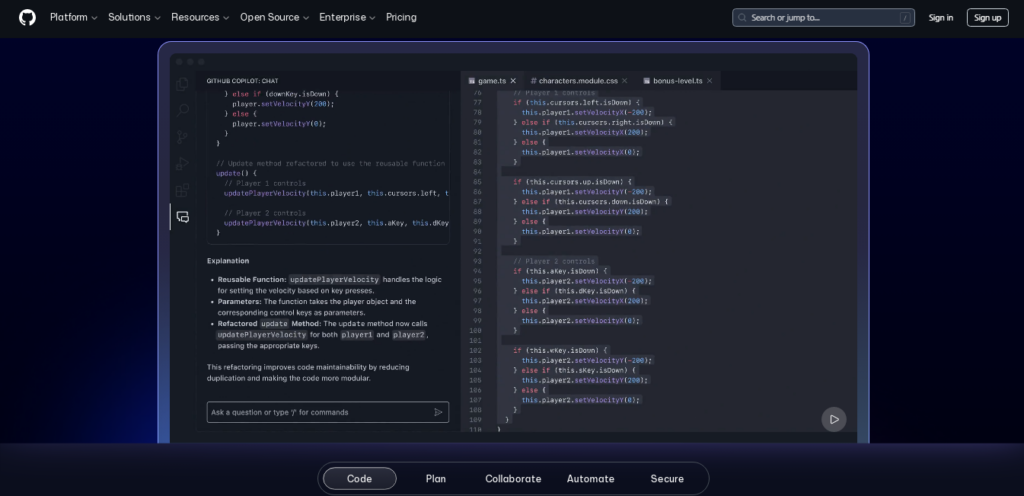
Copilot understands the code you are writing and predicts the next logical lines. It reads the function name, comments, and context to suggest accurate code. For example, if you write a comment like “validate email input,” Copilot will generate a full email validation function in a moment. Instead of spending minutes thinking and typing, you get the solution instantly.
Why is GitHub Copilot a Game-Changer?
Developers often spend hours searching online for solutions. Copilot reduces this struggle. It gives suggestions directly inside the editor. Just imagine how much time you save when you no longer switch between browser tabs and documentation.
Moreover, when beginners struggle to remember syntax, Copilot guides them smoothly and helps them learn along the way.
Who Can Use GitHub Copilot?
Do you think you need to be an expert to use GitHub Copilot?
Actually, you don’t. Anyone can use it, including beginners who are just learning to code. Students, freelancers, full-time developers, and startups can benefit. Since it supports many programming languages, everyone finds value in it.
Using Copilot in Real Development
Developers use Copilot to build real applications faster. It writes functions, classes, components, and even full modules. If you are stuck, Copilot gives direction.
If you have an idea, Copilot brings it alive quickly. It feels like working with a silent team member who observes, understands, and supports your progress without needing coffee breaks.
Does Copilot Replace Developers?
This is the question everyone asks. Does AI replace programmers?
The answer is clear: No. Copilot supports developers and accelerates development, but the creative thinking, logic, and planning always come from humans. Think of it like driving a car. AI gives automatic gears and backup cameras, but the driver still controls the journey.
Limitations Developers Should Know
Every powerful tool has limitations. Copilot does not always generate perfect code. Developers need to review every suggestion. Sometimes the AI may misunderstand the requirement or suggest code that needs fixing. That is why the developer remains the captain of the project.
Why Developers in 2026 Should Learn It
The world is moving fast and companies now expect developers to deliver results quicker. Those who use AI tools like Copilot stay ahead of others. Learning Copilot today prepares developers for the technology-driven job market of tomorrow. If tools exist that make life easier, why not use them?
Conclusion: The Future Belongs to Smart Developers
Developers who use AI will grow faster in 2026 and beyond. GitHub Copilot is not just a tool but a partner that helps you write better code, learn faster, and stay competitive. Did you find this article useful? Would you share this article with someone who loves coding?
Maybe a friend, student, or colleague who should know about the future of development? Your one share might inspire someone’s career.
FAQs
1. Is GitHub Copilot free to use?
GitHub Copilot offers paid plans, but students and open-source contributors get discounts or free access.
2. Does Copilot work offline?
Copilot needs an internet connection to process code and generate suggestions.
3. Can Copilot write full applications automatically?
Copilot writes large portions of code, but developers must organize logic, architecture, and decisions.
4. Is GitHub Copilot safe to use?
Yes, but developers must review the code to ensure correctness and avoid licensing issues.
5. Can beginners use Copilot for learning programming?
Absolutely. Copilot helps beginners understand syntax and structure faster.