


Have you ever looked at a beautiful Poster, Logo, or Social media post and wondered, “How did they design such amazing stylish alphabets?”
What if you could create those same eye-catching alphabets in just a few seconds, without learning design software or hiring a professional?
This is exactly where Google GenType surprises you. It quietly turns simple words into stunning alphabet designs using AI, and once you understand how it works, you may never look at letters the same way again.
What Makes Google GenType So Special?
Google GenType is an experimental AI tool from Google Labs that creates the entire English alphabet in a visual style you describe. Instead of downloading fonts or drawing letters manually, you simply explain your idea in plain English. Then the AI does the hard work for you. Have you ever imagined alphabets made of gold, jelly, ice, wood, or neon lights?
GenType brings those ideas to life instantly. The tool focuses on creativity rather than technical complexity, which makes it perfect for beginners.
Why Did Google Create GenType?
Google often builds small experimental tools to show what AI can do in daily life. GenType proves that AI can help with creativity, not just coding or calculations. It removes the fear people feel when they hear words like “design” or “graphics.”
Instead, it invites everyone to play, explore, and create. Have you noticed how content today needs to look unique to stand out? GenType solves that problem by giving you original visuals every time.
Who Can Use Google GenType?
You do not need to be a designer to use GenType. Students can use it for school projects. Teachers can create learning materials. Social media creators can design eye-catching posts. Small business owners can experiment with logo ideas.
Even kids can enjoy generating colorful letters for fun. If you can type a sentence, you can use GenType. That simplicity makes it powerful.
What Is GenType?
GenType is an experimental tool from Google Labs that lets you generate A–Z alphabets in any style you imagine. You type a simple prompt like:
“Golden 3D letters with shining effects on a black background.”
And GenType creates 26 letters that match your theme.
It’s fun, fast, and useful for content creators, teachers, students, and designers.
How to Use GenType (Step-by-Step)
Step 1: Visit the GenType Website
Go to labs.google/gentype
Since this is an experimental tool, you may need to sign in with your Google account if prompted.
Step 2: Type Your Prompt
You will see a text box asking you to describe the style you want.
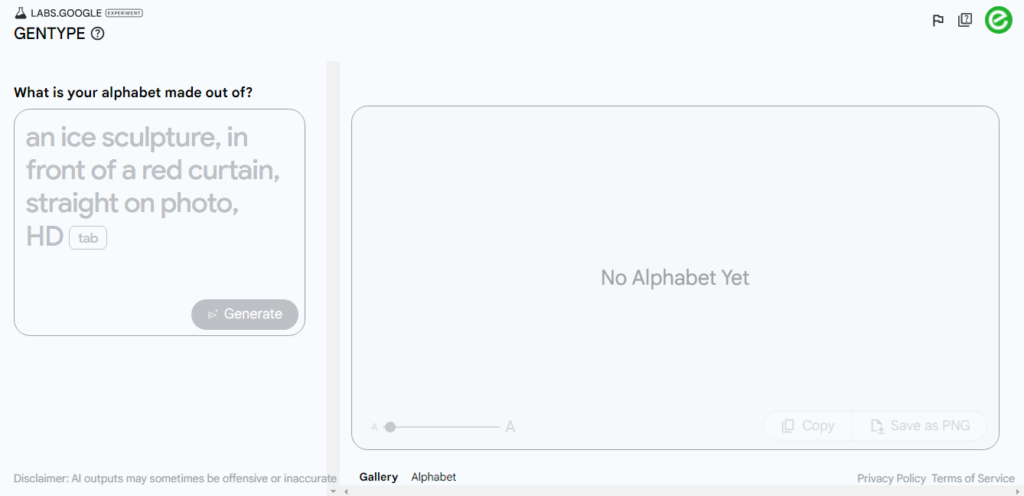
For example:
- “Wooden letters carved from tree trunks”
- “Cute cartoon jelly letters”
- “Neon glowing letters with cyberpunk style”
- “Luxury gold metal letters on plain white background”
Your description controls how the letters will look.
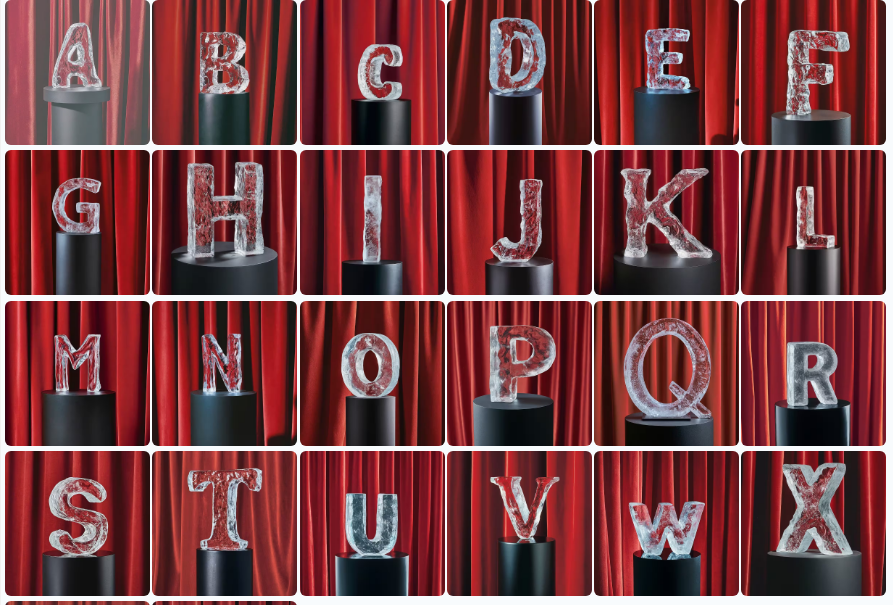
Step 3: Click ‘Generate Alphabet’
After entering your prompt:
- GenType sends the prompt to the AI model
- It generates all 26 letters (A to Z) in one go
- Each letter follows the same style
This usually takes a few seconds.
Step 4: Review and Regenerate Individual Letters
Not happy with some letters?
GenType allows you to:
- Regenerate any specific letter
- Keep the rest unchanged
This is helpful when certain letters don’t look perfect.
Step 5: Download Your Alphabet
When you’re satisfied:
- Click Download
- You get a ZIP file with all letters as PNG images
You can now use them in:
- Posters
- Logos
- School projects
- Social media designs
- Invitations
- YouTube thumbnails
- Graphic design tools like Canva, Photoshop, Figma, etc.
Pro Tip: Create Clean Backgrounds for Easy Editing
GenType does not support transparent backgrounds, even if you request it.
However, you can get a clean, single-colour background (like pure white or pure black), which makes background removal easy.
Try this prompt:
“Create alphabet letters in [your style] on a pure white background with no shadows, no textures, and no gradients.”
This gives you clean PNGs that you can quickly remove background from using Canva or any BG-remover.
Best Prompt Ideas to Try
Here are some popular prompts that produce beautiful results:
- “Crystal letters made of ice with a white background”
- “Glossy chocolate letters with smooth texture”
- “Metallic silver 3D letters with soft reflections”
- “Graffiti-style letters with vibrant colours”
- “Minimal, flat-style alphabet with soft pastel shades”
- “Fantasy magical letters glowing with sparkles”
You can get very creative!
Where Can You Use GenType Alphabets?
GenType letters are image-based graphics, not traditional .ttf fonts.
So they work best in:
- Creative posters
- Event titles
- Logo concepts
- Digital art
- Instagram story covers
- YouTube thumbnails
- Kids’ learning materials
- Book or notebook covers
They make anything look more unique and eye-catching.
Final Thoughts
Google GenType is a simple but powerful AI tool that turns your imagination into beautiful alphabet designs. Whether you’re a designer or a beginner, you can create amazing visuals in just a few seconds.
Try different prompts, experiment with styles, and have fun exploring what AI can do!
Frequently Asked Questions (FAQ)
1. Is Google GenType suitable for beginners?
Yes, GenType works perfectly for beginners because it uses simple text prompts.
2. Can I create transparent background alphabets in GenType?
No, GenType does not support transparent backgrounds, but clean backgrounds help with editing.
3. Does GenType create font files like TTF or OTF?
No, GenType creates image files, not downloadable font formats.
4. Can I use GenType designs for commercial projects?
You should review Google Labs usage terms before commercial use.
5. Do I need design software to use GenType alphabets?
No, you can use the images directly or edit them using simple tools like Canva.